
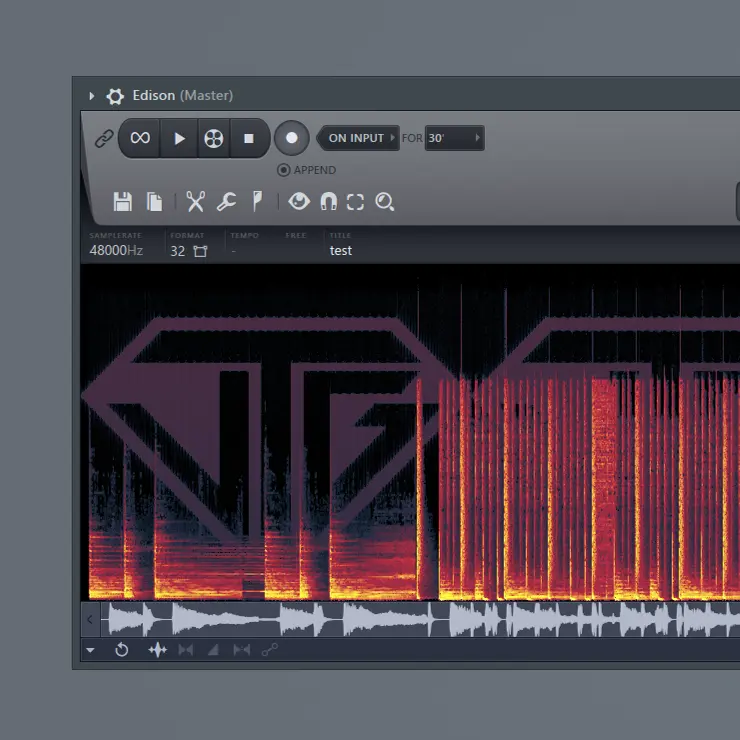
A picture in the sound
Our test beat before and after watermarking
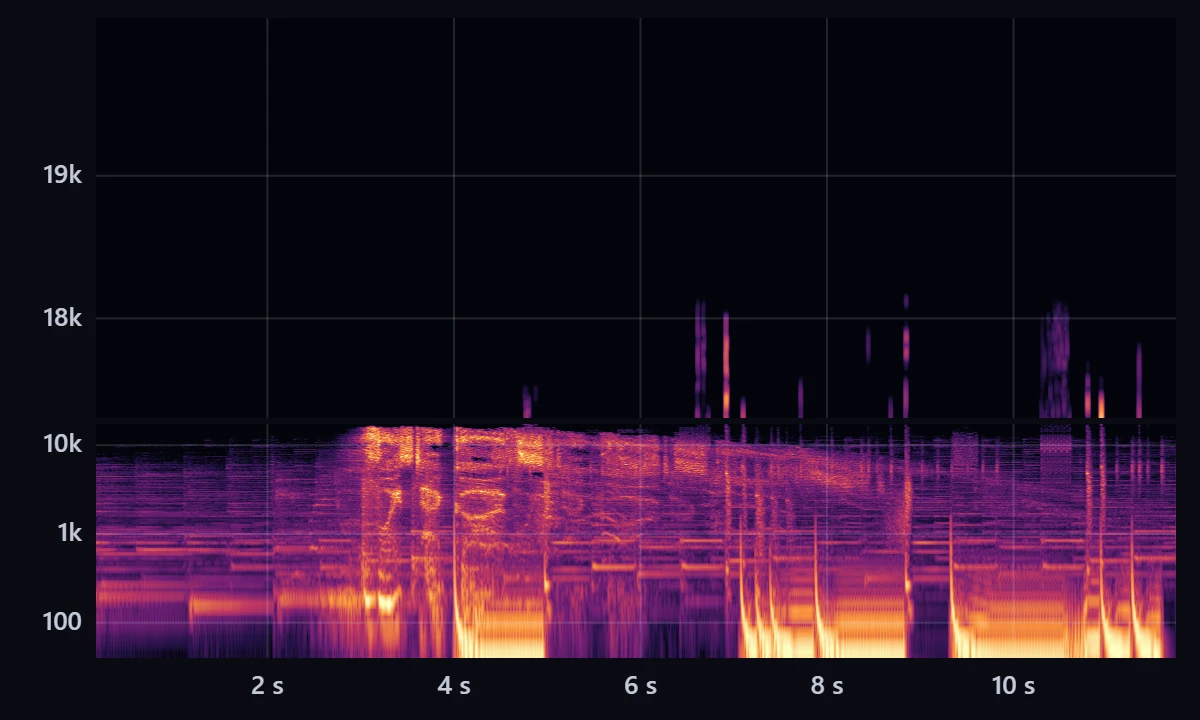
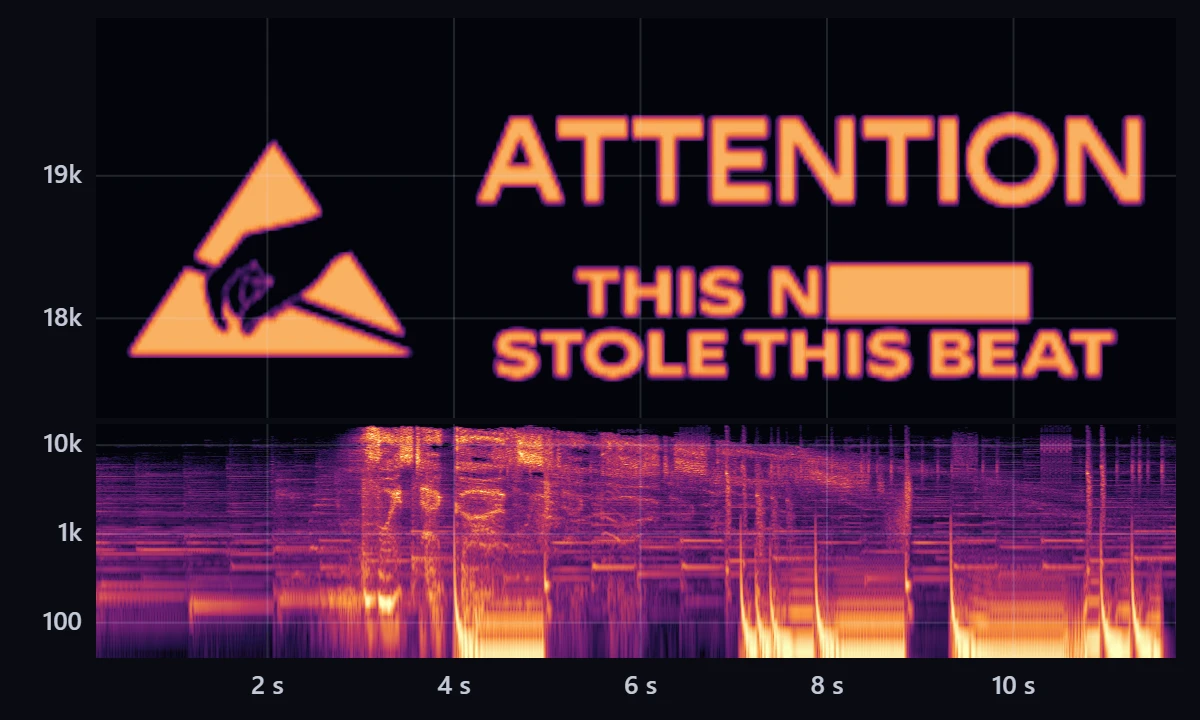 BeforeAfter
A spectrogram draws sound as an image: time runs left to right, pitch bottom to top, and loudness becomes brightness. Control those three things and you can draw with sound, which is what image-to-audio tools do.[4]
Musicians have done it for decades. Aphex Twin hid a picture on the B-side of his 1999 single “Windowlicker,” the track titled with an equation: about 5:27 in, a burst of noise turns into a grinning face on a spectrogram. It is Richard D. James’s own, made with the program Metasynth.[5] Listeners only spotted it in 2001, and it took a logarithmic frequency scale to see the face properly, Mixmag reported.[6]
Nine Inch Nails turned the trick into a clue. In 2007, during the campaign for Year Zero, USB drives turned up in Lisbon, Madrid, Barcelona and Manchester. One held static that, run through a spectrogram, “revealed a phone number,” Salon reported that March.[7] Mixmag describes a hand hidden in “My Violent Heart” that matches the album’s artwork.[6]
For a producer, a picture like that shows where a file came from only to someone who goes looking for it. It works best in the top of the spectrum, above most of the music, and lossy encoders often cut that band to save space. In our tests below, 128 kbps MP3 and AAC erased it completely.[3] Anyone who spots it can also filter it out.
The code you can’t hear
Before and after watermarking


Transcript / audio description
The 3.54-second audio demo supplied by VoiceTagGods, before watermarking.
Transcript / audio description
The same audio demo after the watermark tool added the VTG logo between 17 and 20 kHz and the hidden ID EE90.
After adds a VTG watermark at 17–20 kHz and a hidden ID EE90.
The other kind of watermark is built never to be seen or heard. Nielsen has long embedded codes in TV audio: an encoder writes a source identifier and a time code into the soundtrack, and meters in panelists’ homes pick them up and report back. Its newer method puts the code lower in the frequency range, the company’s engineering documentation says, so it is “less likely to be ‘compressed out’ of the program audio by TV distribution.”[8]
Generative AI added a new job. Google DeepMind says SynthID marks audio from its Lyria music model and NotebookLM’s podcast feature, that the mark is inaudible, and that it can’t be altered by noise, MP3 compression or speed changes. That is the provider’s claim; we haven’t tested it.[9]
Meta’s AudioSeal, described by Robin San Roman and colleagues in 2024, shows how a newer design works. One network learns to add a quiet signal that stays under the loudness of the speech around it; a second, trained alongside it, scores every sample, so it can say which parts of a recording carry the mark. It can also carry a 16-bit message, and it was trained against edits such as MP3 and AAC compression, filtering and speed changes. It can only find speech that was marked when it was generated.[10]
Try it on your own audio
The tool runs in your browser, and nothing you add is uploaded. Bring a logo and a track of up to five minutes, or try ours. Three steps put both kinds of mark in at once, a picture you can see and an ID you can’t hear, and a checker further down finds the ID again in any copy.
- Runs on your device. Nothing is uploaded.
- Low-bitrate MP3 or AAC can erase the picture, and a change of speed or pitch erases the ID. Neither proves ownership.
What we threw at it
Providers describe their own watermarks; independent researchers test them. In 2024 a group benchmarking three state-of-the-art audio watermarking methods against 15 kinds of manipulation, from compression to deliberate attacks, concluded that their findings “highlight the vulnerabilities of current watermarking techniques.” They tested forgery, a fake watermark planted on unmarked audio, as well as removal. We didn’t test those systems ourselves, so the claims on either side are theirs.[11]
We did test ours. On Oct. 22, 2026, we marked six of our own clips, five vocalist demo reels and one beat between 12.5 and 68 seconds long, then put each through the kind of treatment a beat gets after it leaves the producer. A pass meant the checker found the mark and read the right ID.
| What we did to the marked file | Result |
|---|---|
| Encoded as 128 kbps MP3, 128 kbps AAC or 64 kbps Opus | Found, right ID, on all six clips |
| A vocal recorded over the beat, then 128 kbps MP3 | Found, right ID, on all six clips |
| Compression and limiting, 8 dB louder | Found, right ID, on all six clips |
| EQ: bass up 6 dB, treble down 6 dB, a 4 dB boost at 2.5 kHz | Found, right ID, on all six clips |
| Everything above 4 kHz filtered out | Found, right ID, on all six clips |
| Resampled to 44.1 kHz and saved as 192 kbps MP3 | Found, right ID, on all six clips |
| Trimmed to start 13 seconds in | Found, right ID, on all six clips |
| A 12-second excerpt dropped into another song | Found, right ID, placed within half a second of where it starts and ends |
| Played 1% faster, raised a semitone, or sped up 2% at the same pitch | Lost on every clip we tried, apart from a few seconds of one clip after the tempo change |
| The same clips without a mark | Never reached the detection threshold (highest score 5.3; a mark counts at 7) |
Six different IDs, each sent through six of those edits on two clips, came back exactly right all 72 times. The logo is more fragile. On our 12.5-second test beat it stayed intact at 256 kbps AAC and readable at 320 kbps MP3 and 160 kbps Opus, smeared at 64 kbps Opus, broke into fragments at 192 kbps MP3, and was gone at 128 kbps MP3 and AAC.
The method underneath, spread-spectrum watermarking, is decades old; Microsoft researchers Darko Kirovski and Henrique Malvar set out ways to use it on audio in 2003.[1] Our checker adds AudioSeal’s other idea: it lines the pattern up against a recording second by second, so it can say where the ID is.[10] Lining up sample by sample also means anything that stretches time or shifts pitch throws it off; AudioSeal was trained against speed changes, and ours was not. Quiet, sparse passages carry less of the ID, because there is less music to hide it under. The pattern is also the same for every user, so that anyone can check a copy, which makes it easier to study and strip out.[10]
Check any copy
The checker reads IDs added by the tool above. Drop in your watermarked file, an MP3 copy of that file or a song made with the watermarked beat. The waveform highlights where the ID is found.
- Runs on your device. Nothing is uploaded.
What a producer can actually use
For someone selling beats, the audible tag is still the tool under their own control. A tag usually comes one of three ways: commissioned from a professional vocalist, recorded by the producer, or generated from typed text. VoiceTagGods, which publishes this blog, sells the first kind; its vocalists are here. BeatStars builds tagged previews from a default voice tag, and sellers can upload their own or generate one from text on the Starter, Growth and Professional plans.[12] Where the tag sits in a preview is covered in our placement guide.
A watermark can remain in a delivered file after an audible tag has been removed. To use the ID to trace a delivery, keep a record of who received each marked copy. The questions it can’t answer, such as who owns a tag or a beat, are the subject of our feature on producer tag rights.
Fingerprinting services search for matching uploads. BeatStars’ Beat ID scans YouTube, Facebook, Instagram, Twitter and TikTok for copies of a seller’s uploads and links to each one it finds.[13] YouTube’s own Content ID is open only to rights holders who “own exclusive rights to a substantial body of original material that is frequently uploaded to YouTube.”[2]
BeatStars stopped accepting new tracks into Content ID & More on Dec. 8, 2025, and said enrolled tracks would be removed from YouTube, Meta and TikTok by Jan. 14, 2026. When we checked its help page on Oct. 22, 2026, it still said no replacement was available.[14]
| Question | Producer tag | Audio watermark | Audio fingerprint |
|---|---|---|---|
| Can you hear it? | Yes, by design | No; providers describe theirs as inaudible[9] | Nothing is added; the recording itself is the match[2] |
| What it carries | A name or phrase, in a voice | A hidden code, such as a source and a time stamp, or a picture[8] | No message; a reference file in a database[2] |
| Who reads it | Listeners, artists, buyers | A detector or meter that knows the code, or anyone with a spectrogram[8] | The platform’s matching system[2] |
| How do you get one? | Commission one from a professional vocalist, record your own, or generate one from text[12] | Run the file through an encoder, such as the tool above | Register through a service; YouTube limits Content ID to large rights holders[2] |
| Can it be removed? | It can be cut, muted or masked; clean delivery depends on the licence | Designed to survive common edits, but a 2024 benchmark found weaknesses in the methods it tested[11] | Nothing is added to remove; matching has its own limits |
A routine for marking beats you sell
Tag the previews
Use an audible tag on public previews or beats you send out for consideration.
Mark each delivery
Run the file a buyer receives through the watermark tool, and write down which ID went to whom. The ID is in the downloaded file’s name.
Check what turns up
When a song or a leak appears, check a copy. A matching ID can help identify which delivered copy was used.
Let matching do the searching
A fingerprinting service can search for matches across the platforms it supports.[13]
Keep the paperwork
Licences and contracts settle what a buyer may do. A tag, a watermark or a match can support your side, but none of them proves who owns a beat.